How to convert PDF sheet music to MusicXML

To convert PDF sheet music to MusicXML, run the PDF through a music recognition tool, check what it read against the page, fix the wrong notes, then export MusicXML and open it in your notation program. Before you do any of that, find out whether the MusicXML already exists. For piano music, PlayableNotes reads a PDF in a minute or two, and the MusicXML download is free.
A PDF of sheet music is a picture of the notes, even when it was exported from MuseScore or Sibelius: the pitches and rhythms were flattened into shapes on a page. Getting them back is a job for optical music recognition (OMR), software that looks at the staves and works out what's written. How well it goes depends on the PDF, the tool and how carefully you check the result.
A clean PDF exported from notation software reads better than a scan of a worn photocopy. Tools differ in what they read (many instruments, or piano only) and where they run: on your computer, in a browser or in an app. No tool gets every page right, so expect to correct some notes and put some markings back by hand.
Checking takes time, but less than typing every note in both hands.
Look for the MusicXML before you convert anything
If the PDF came from a colleague or an arranger who works in notation software, the file that made it exists somewhere. Ask for it. A MusicXML file, or the notation program's own file, beats any conversion, because nothing has to be guessed.
The same goes for public-domain music. Archives that post PDFs sometimes post the notation file on the same page, so look for a MusicXML, .mxl or MuseScore download before you reach for a converter. If it's a standard piano piece, it may already be in the PlayableNotes library of public-domain piano pieces. Making your own copy of one and downloading its MusicXML costs nothing.
Know what kind of PDF you have
Zoom in on a few bars. If the staff lines are perfectly straight and the noteheads stay crisp at any zoom, the PDF was made by notation software, the easiest kind to read. If the page is slightly tilted, the edges are gray, or you can see the texture of paper, it's a scan: a photo of a page inside a PDF. A scan reads like a photo, so blur, skew, speckle and faint print all cost you corrections later.
The kind of PDF also narrows the tools. A PDF exported from notation software keeps its staff lines and note symbols as drawn shapes, and PDFtoMusic Pro reads those directly instead of looking at a picture; it can't read a scan at all. The other tools in the table below read scans as well.
If you're scanning the pages yourself, press each one flat on the glass. When the scan is poor and you own the book, a fresh photo can beat the PDF. Lay the page flat, light it evenly, keep the whole page in the frame, and photograph one page per picture. A publisher's PDF or a clean public-domain edition is better than either.
Pick a tool that reads your kind of music
These are the common converters, with the limits each one publishes:
| Tool | What it reads | Where it runs | MusicXML export |
|---|---|---|---|
| PlayableNotes | Piano music only (treble and bass staff together) | Browser | Free; reading costs 1 credit per line of music |
| Audiveris | Printed music | Desktop (Windows, macOS, Linux) | Free and open source |
| PlayScore 2 | Multi-staff scores, including piano and choir | iOS, Android and Windows apps | PDF reading and MusicXML export need its Professional subscription |
| Scan2Notes | Multi-instrument music | Browser | Free preview of the first 12 measures; full scans need Scan2Notes Pro |
| MuseScore Import PDF | PDFs | musescore.com, opened from File > Import PDF in MuseScore 4 | Check the page for current terms; the score opens in MuseScore, which exports MusicXML |
| PDFtoMusic Pro | PDFs exported from notation software; no scans | Desktop (Windows, macOS, Linux) | Paid license; the free trial handles only the first page |
| ScanScore | Printed scores; the Ensemble license reads up to four staves per system | Desktop (Windows, macOS) | Paid license for 365 days; the 14-day trial can't export |
| Flat PDF Import | PDFs of standard notation, exported or scanned | Browser and Flat's mobile apps | Paid per page with credits, or a monthly page allowance on Flat Power; the score opens in Flat, which exports MusicXML |
| ACE Studio PDF to MusicXML | Up to two staves; the first 5 pages of a PDF | Browser | Free for 10 conversions a day |
For a choir score, a band arrangement or a lead sheet, use one of the multi-instrument tools. PDFtoMusic Pro is built for clean PDFs that came out of notation software, for any instrument. If it's a piano piece you also want to play back, simplify or send to a student, that's what PlayableNotes is for.
Before you choose, read the same page in each tool you're considering and count the corrections. For prices, limits and a longer side-by-side, see the best sheet music scanners for piano.
Check the reading against the PDF before you export
Fix mistakes in the recognition tool, not after export, so every format you download (MusicXML, MIDI or PDF) is already right. Keep the original PDF open beside the result and listen while you follow the page, because a wrong note is easier to hear than to see.
Look hardest at these:
- Accidentals, especially naturals that cancel an earlier sharp or flat in the same bar.
- Ties, and notes on ledger lines above and below the staff. The piano notes chart shows where each note sits if you need to check one.
- Bars that sound a beat too long or too short, which usually means a missed dot, rest or triplet.
- Repeats, first and second endings.
- Clef, key and time-signature changes partway through the piece, including ones the tool added that aren't in the original.
- In piano music, notes that cross from one staff to the other, and bars where one hand plays two voices at once.
Check again in your notation program
MusicXML carries notes well, but no format carries everything, and every program lays the page out its own way. The file may end in .musicxml, .xml or .mxl, the compressed form; MuseScore, Sibelius and Dorico open all three. Open the file, play it once, and check the markings.
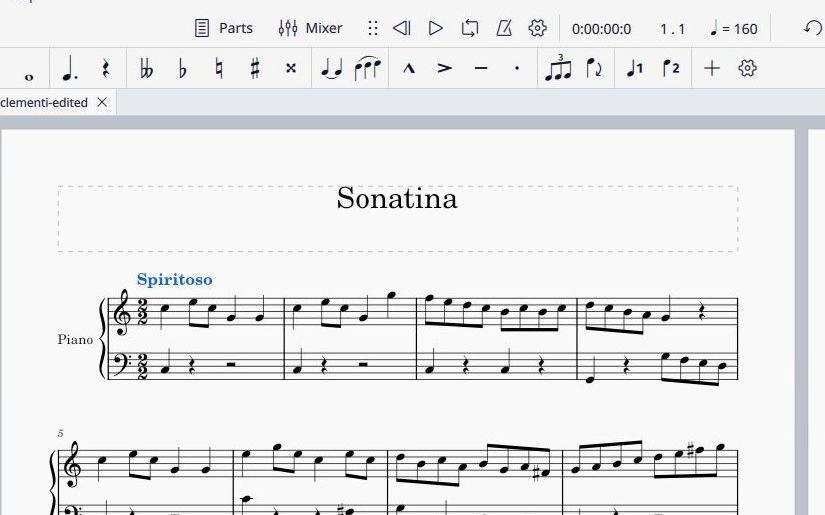
The site's PDF to MuseScore worked example shows what that looks like. The first movement of Clementi's Sonatina in C, Op. 36 No. 1, all 38 bars, was read from a one-page PDF, exported as MusicXML and opened in MuseScore. All 333 written notes, their rhythms and both repeated sections came through. One thing was fixed before export: a time-signature change at bar 5 that isn't in the original. After import, the tempo word "Spiritoso" was missing, so it went back in by hand in MuseScore; the composer credit and some expression details still needed attention.
Doing this in PlayableNotes
PlayableNotes reads piano music: a treble and a bass staff played together. Here's the whole route from PDF to MusicXML:
- Upload the PDF. Before anything is read, you see each page in order and the number of credits the reading will use.
- Wait a minute or two while it reads.
- Play it back on a sampled piano, with the notes lighting up as they sound, and follow along in your PDF.
- Fix what's wrong. Click a note to open that bar in the measure editor, then drag the note, add a note or change a length, or describe the fix to the AI chat. If a page came out badly, you can upload a sharper copy and read that instead.
- Download MusicXML. Downloads are free, so you can export again after more corrections, and MIDI and PDF are there too.
Reading costs 1 credit per line of music, a line being the treble and bass staff together from one edge of the page to the other. The Clementi page above has eight lines, so it costs eight credits. A typical page of piano music has 5 to 7. You're never charged more than the count you saw, you're charged less if fewer lines are found, and a reading that fails costs nothing.
New accounts get 50 free credits; after that, packs are 100 credits for $10, 300 for $25 or 1000 for $70, with no subscription. Everything else, including editing, playback and every download, is free. The pricing page has the details.
Know where it stops. It won't read a choir, band or orchestral score, guitar tab or a lead sheet, and handwritten manuscripts aren't a supported input. Readings aren't always perfect, so check each one against the page.
If the piece is for a student, you can make an easier version before you export. Ask for an easier left hand or a simpler key and the result becomes a new version, with the original still there.
Try it with a PDF of your own at your projects page; your first 50 credits are free.
FAQ
Can I convert a PDF of sheet music to MusicXML online for free?
Yes, within limits. ACE Studio's browser converter is free for 10 conversions a day, reading the first five pages of a PDF with up to two staves. PlayableNotes gives new accounts 50 free credits, which covers several pages of piano music at 1 credit per line, and its MusicXML downloads are free. Audiveris is free too, but it's desktop software you install, not a website.
Will an ordinary PDF to XML converter make MusicXML?
No. A general PDF to XML converter describes the page's text and layout, and the notes on a sheet music page are drawn shapes, so you get XML with no pitches, rhythms or bars in it. MusicXML has to come from a music recognition tool such as Audiveris, ScanScore or PlayableNotes, or from the notation file the PDF was made from.
Will the MusicXML open in MuseScore, Sibelius or Dorico?
Yes. MusicXML is the standard exchange format, and MuseScore, Sibelius and Dorico all open it. Expect to check the result after import: notes and rhythms usually come through, while tempo words, expression marks and the composer credit may need adding back.
Can it convert a choir, band or orchestral PDF?
Not PlayableNotes: it reads two-staff piano music only. For choir, band or orchestral scores, use a multi-instrument recognition tool such as Audiveris, PlayScore 2 or Scan2Notes, and check the result part by part.
Can I convert handwritten sheet music to MusicXML?
Handwritten manuscripts aren't a supported input in PlayableNotes, and Audiveris is built for printed music. For a handwritten page, plan on entering the notes yourself in a notation program.