Skip to the shortlist

The piano teacher’s buyer guide · 2026

Best sheet music scanners for piano in 2026: the buyer’s shortlist

The best scanner is the one that gets your page to the next useful step: listening, correcting, arranging or sharing a lesson. Here are four options for piano PDFs and photos, with costs, tradeoffs and a practical way to choose. Start with your own music, and leave time to check the result.

Publisher disclosure: we make PlayableNotes, one of the tools below. This is an editorial comparison of documented workflows, not an independent accuracy test or a paid ranking.

The quick read

Five things to know before you choose

  1. Pick the next task. Listening, arranging and exporting need different workflows.
  2. Compare the right plan. PDF input, export and staff limits can change what you need to buy.
  3. A line is not a page. PlayableNotes credits count systems of piano music; other products use subscriptions or licenses.
  4. Check the student handoff. A browser practice link and a file that needs another app are different experiences.
  5. Try the same source page. Compare corrections and usable output before trusting any accuracy claim.

Understand the category

What a sheet music scanner does—and where it stops

Music recognition turns a picture of notation into notes a computer can interpret. That can support playback, editing and export. A PDF viewer simply displays the page; it does not necessarily recognize its notes. Audio-to-score transcription starts with a recording and solves a different problem.

For this guide, “piano” means a printed piano part, usually on two staves. Complex voices, faded scans, annotations and unusual notation deserve a careful trial. Check the recognized notes, then choose playback, correction, export or arrangement.

Watch a real page become a checked teaching version ↓

Our method

Same questions. Four different workflows.

We chose four tools that cover distinct piano scanning needs and compared their official documentation on October 14, 2026. We reviewed PlayableNotes’ published worked example and current pricing. We did not run the four scanners against a shared test set, so the order below is by use case, not measured quality.

01

Price and allowance

What is free, what is paid, and what unit or limit applies?

02

Device and input

Where does it run, and can it read the source you have?

03

Correction and editing

Can you fix recognition, transpose or prepare an arrangement?

04

Playback and handoff

How will you or your student hear the result?

05

Exports and limits

What can leave the app, and what conditions matter?

Sources are linked under each product. Prices may change; dollar amounts are the listed US-dollar prices.

Side by side

Compare the plans you would actually use

These allowances are different units. A $10 credit pack and a year of desktop software are not directly interchangeable.

Piano scanner comparison · official sources checked October 14, 2026
Tool / planPrice and allowanceDevice and inputCorrection and editingPlayback and handoffExports and limits
PlayableNotes50 free credits; $10 / 100 creditsOne-time packs; 1 credit per line of piano musicWeb browserPiano PDF or photoNote corrections, AI arrangements and transpositionPiano playback and browser practice linksMusicXML, MIDI and PDFPiano focus; check recognition and every arrangement
PlayScore 2Free camera-page playback; paid subscriptionsPDFs and MusicXML require Professional; regional store pricingiOS, Android and WindowsCamera, image or PDF (plan dependent)Playback controls; export to a notation editor for score editsTempo, loops, part muting and shared PlayScore documentsMIDI and MusicXML with ProfessionalSubscriptions are platform-specific; export use restrictions apply
ScanScore Ensemble$39 / 365 daysEnsemble license; no automatic renewalWindows and macOSScanner, PDF, image or companion-phone captureRecognition correction, score editing and transpositionPlayback in the desktop applicationMusicXML and MIDI; paid license requiredEnsemble: up to 4 staves per system; trial playback and exports restricted
AudiverisFree, open-source softwareNo paid scanning plan; your setup and correction time still countWindows, macOS and LinuxScanned printed music, including PDF and imagesInteractive recognition correctionContinue in an external notation applicationMusicXML and Audiveris project filesPrinted common notation; handwriting unsupported; more setup

On a small screen, swipe the table to read every column. Each tool’s profile below links to its current documentation.

The shortlist

The best piano scanners for four different jobs

Choose the workflow that matches your next lesson, rehearsal or notation project.

For the next lesson · Our product

PlayableNotes

Adapting a piano piece for a student

50 free credits; $10 / 100 creditsWeb browser

PlayableNotes makes sense when reading the page is the start of a teaching task. Upload a piano PDF or photo, compare the recognized notes with the source, then ask for a version that fits a particular student: an easier left hand, smaller stretches or a different key. You can hear the result, correct notes, print a PDF and send a browser practice link. The person preparing the lesson still decides whether the arrangement is musically and physically suitable.

New accounts receive 50 reading credits. One credit reads one line of piano music: the treble and bass staves together across the page, not one whole page. The quote appears before reading. Packs cost $10 for 100 credits, $25 for 300 or $70 for 1,000; credits do not expire. Editing, playback, practice links and exports are free. AI edits have a limit of 100 per day. Credit purchases currently require a US billing address; applicable tax is extra.

The important limit is the piano focus. For a full orchestral score or an on-device recognition workflow, consider another option below. Recognition can miss notes and markings, and an arrangement can need revision. The Minuet example on this page includes an actual correction to an AI arrangement. Use that evidence to understand the workflow, then try a page from your own teaching before buying more credits.

Best suited for: adapting a piano piece for a student.

For listening first

PlayScore 2

Hearing a score on your phone or tablet

Free camera-page playback; paid subscriptionsiOS, Android and Windows

PlayScore 2 is a useful shortlist choice when the immediate question is “what does this page sound like?” Its documentation describes camera and image recognition, tempo adjustment, loops and part controls. You can hear piano music or isolate parts in a larger score. The free app can play camera pages and shared PlayScore documents; creating multi-page documents or working from a PDF requires a subscription. Professional is the tier to check for PDF reading and MusicXML export.

A teacher can send a PlayScore document for a student to play in the free app. That is a different handoff from a browser practice link: the recipient uses PlayScore. Recognition and document storage happen on the device, according to the publisher. If keeping the scanning workflow on your device is a priority, this distinction may matter more than the headline feature list.

Check the Store screen on the device you intend to use for the actual price in your region. Subscriptions for iOS, Android and Windows are sold separately; do not assume one purchase unlocks every platform. For detailed notation changes, plan a MusicXML handoff to your score editor and inspect the imported result. The publisher also says generated MIDI and MusicXML files are for noncommercial use and directs commercial-use inquiries to support. Teachers preparing material for paid work should clarify that condition before relying on exported files.

Best suited for: hearing a score on your phone or tablet.

For desktop correction

ScanScore Ensemble

Correcting and transposing a score on desktop

$39 / 365 daysWindows and macOS

ScanScore Ensemble is the desktop option here for musicians who want to spend time correcting a scan before continuing in other music software. The published workflow accepts scans, PDFs and images, with a phone capture option, then provides playback, editing and transposition. Its scan and score views make the recognition-to-editing process explicit. For a teacher already comfortable working in a desktop score editor, this can be a practical step between the original page and a reusable notation file.

The Ensemble license is listed at $39 for 365 days from activation, with no automatic renewal. It supports up to four staves per system, which covers an ordinary two-staff piano part. The cheaper Melody license is limited to one staff, so it is not the equivalent piano plan. Professional is listed at $79 for 365 days and removes the staff-count limit. Count the simultaneous staves in your source before choosing a license, particularly for piano duets or accompaniment with extra instrumental parts.

A 14-day trial is available with playback and export limits; exporting to notation software requires a paid license. Use the trial to inspect recognition and correction with your own pages before buying. Our recommendation is about the documented desktop workflow, not a measured accuracy advantage. If your main need is a ready-to-share student practice page or an AI adaptation for a particular hand span, include those requirements in your trial comparison rather than treating scanning alone as the finished lesson.

Best suited for: correcting and transposing a score on desktop.

For hands-on users

Audiveris

A free, open-source route into MusicXML

Free, open-source softwareWindows, macOS and Linux

Audiveris belongs on the shortlist for someone who wants an open-source recognition tool and is willing to learn its correction workflow. It reads digitized printed music, lets you inspect and repair the recognition, and exports MusicXML for another notation application. Its own project format preserves the recognition work so you can return to it. This makes it a useful starting point when your destination is an editor you already use, rather than a student-facing practice service.

There is no paid scanning subscription to compare with the commercial options here. The software is distributed under the AGPL, and installation instructions are maintained by the project. Budget for the time to install it, understand the interface and check your score. A zero software price does not tell you how quickly a specific page will become usable. For a fair trial, use the same source page and count the corrections you need before the MusicXML sounds and reads correctly in your destination editor.

Audiveris explicitly limits its scope to printed common Western music notation; handwritten scores are unsupported. Its handbook acknowledges imperfect recognition and makes manual verification central to the workflow. Playback, transposition and arrangement continue in external music software, so include that second application in your decision. Choose it when control over the recognition process and an open-source tool matter more than having one integrated teaching workflow. For a deadline-driven lesson, allow time to test the complete import-and-edit sequence before committing to it.

Best suited for: a free, open-source route into musicxml.
Make your decision

Which tool fits your next piece?

Editorial recommendations by task
Your next taskStart hereConfirm before committing
Make a piano part fit a studentPlayableNotesCheck the recognized notes and the arrangement against the student’s needs.
Hear a page and loop a passage on your devicePlayScore 2Choose the tier for your input and check your platform’s subscription price.
Correct and transpose a scan on desktopScanScore EnsembleCount staves per system and confirm the license needed to export.
Convert printed scans using open-source softwareAudiverisAllow installation and correction time, then test MusicXML in your editor.

Evidence you can inspect

A real piano page.
A checked teaching version.

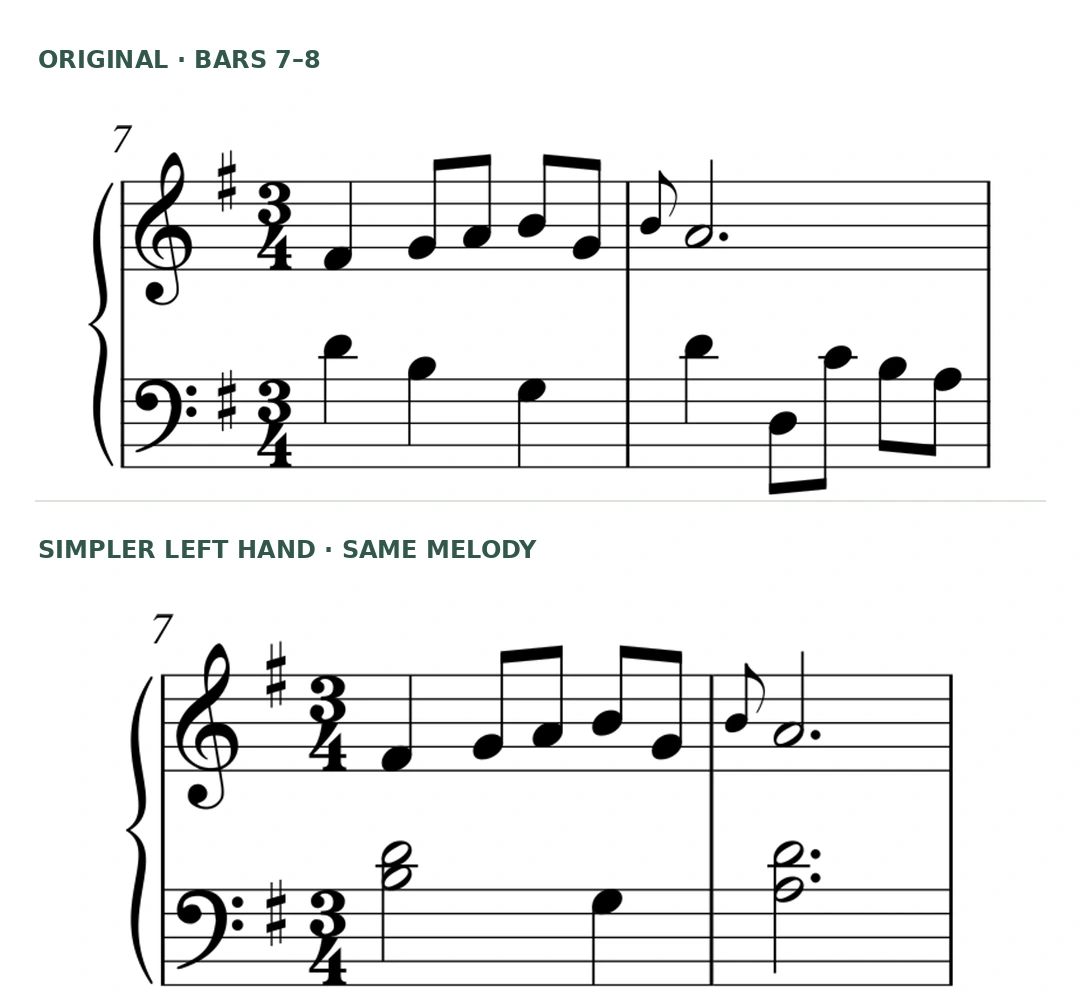
This PlayableNotes example follows the complete 32-bar Petzold Minuet: the source PDF, a checked reading, a simpler left hand and a version in C. Open the source and complete files to follow each change.

Edited walkthrough; waits shortened. Piano audio comes from the exported MIDI. Read the transcript.
32 bars

The complete piece, with source and outputs available.

6 credits

The actual quote for six lines on this one-page source.

Review included

A left-hand note in bar 23 was corrected in the arrangement.

One clean page needed no note corrections at recognition; the arrangement still needed musical review. Your source may behave differently. Inspect the complete lesson and downloads and the source and correction record.

Before you choose

Frequently asked questions

What is the best sheet music scanner for piano teachers?

Choose for the job after scanning. PlayableNotes suits adapting piano music for a student; PlayScore 2 suits listening and part practice; ScanScore Ensemble suits a desktop correction workflow; Audiveris suits an open-source MusicXML workflow. These are editorial use-case recommendations, not the result of a comparative accuracy test.

What does PlayableNotes cost?

A new account starts with 50 reading credits. One credit reads one line of piano music, with the two staves counted together. Packs are $10 for 100 credits, $25 for 300 or $70 for 1,000. Credits do not expire. Playback, manual editing, practice links and exports are free; AI edits are limited to 100 per day. Purchases currently require a US billing address, with applicable tax extra.

Can I scan sheet music for free?

Yes, within different limits. PlayableNotes includes 50 reading credits. PlayScore offers free camera-page playback and playback of shared PlayScore documents, with subscriptions for additional functions. Audiveris is free software, with installation and correction work left to you. ScanScore offers a 14-day trial with playback and export limits; exporting to notation software requires a paid license.

Will a scanner read every note correctly?

Do not assume it will. Compare notes, rests, accidentals, voices, repeats and markings against the original, then listen. A correct-looking bar can still play incorrectly. This guide does not establish an accuracy winner: the products have not been tested here on the same set of scores.

What is the difference between MusicXML and MIDI?

MusicXML is the usual choice for moving editable notation into a score editor. MIDI is useful for note playback and music-production tools, but is not a substitute for a complete printed score. Check both the imported music and the layout in your destination application.

Can I scan handwritten music or a whole ensemble score?

Treat those as separate requirements. Audiveris explicitly excludes handwriting. PlayableNotes focuses on piano music. ScanScore Ensemble supports up to four staves per system; its Professional tier allows more. PlayScore documents multi-staff recognition. Test your exact notation and confirm the relevant plan before paying.

Can students listen without buying their own subscription?

PlayableNotes practice links open in a browser without a student account. A shared PlayScore document plays in the free PlayScore app. These are different sharing workflows, so try the actual student handoff on their device before preparing a whole set of lessons.

Can I use the exported music in paid teaching work?

Check both your rights to the source music and the tool’s export conditions. PlayScore’s documentation specifically restricts generated MIDI and MusicXML to noncommercial use and asks commercial users to contact support. A software purchase does not itself grant rights to someone else’s music.

Start with the music you teach

Bring the next page.
See what it needs.

If your goal is a piano piece adapted for a student, try your own page in PlayableNotes. Check the reading, hear your changes and decide whether the workflow fits your lessons.

Read my piano page →

50 free reading credits. No card needed.
More new readings use credits; editing and exports are free, with up to 100 AI edits a day. See credit packs.

Bars 7 and 8 of Petzold’s Minuet showing the original and simpler left-hand parts from the worked lesson.
Original and simpler left hand, from the complete Minuet example.